
Cluster Commands
Clusters are named groups of DGX Spark hosts. Save your hosts once and reference them by name in every command.
The first host in a cluster definition is used as the head node for multi-node jobs.
Create a cluster
Section titled “Create a cluster”sparkrun cluster create <name> --hosts <ip1>,<ip2>,... [options]| Option | Description |
|---|---|
--hosts / -H | Comma-separated host list |
--hosts-file | File with hosts (one per line) |
-d / --description | Cluster description |
--user / -u | SSH username for this cluster |
--cache-dir | HuggingFace cache directory on cluster hosts (useful when control machine and cluster have different paths, e.g. macOS → Linux) |
--transfer-mode | Resource transfer mode: auto, local, push, or delegated |
--transfer-interface | Network interface for transfers: auto, cx7, or mgmt |
--scheduler | Placement scheduler (default occupancy-sparse). See Schedulers & Placement. |
--max-gpu-mem-util | Fraction of each accelerator’s memory treated as usable for placement |
--executor | Pin the launch executor for this cluster |
--executor-opt / -o | Per-executor config, -o key=value (repeatable) |
--default | Set this cluster as the default after creating it |
sparkrun cluster create mylab \  --hosts 10.24.11.13,10.24.11.14 \  --user dgxuser \  -d "2-node DGX Spark cluster"
# With transfer mode for external control machinessparkrun cluster create mylab \  --hosts 10.24.11.13,10.24.11.14 \  --transfer-mode push
See Resource Transfer Modes for details on transfer mode options.
Update a cluster
Section titled “Update a cluster”sparkrun cluster update <name> [options]All options are the same as create. Only provided options are updated — omitted fields are left unchanged. Pass --user "" or --cache-dir "" to explicitly clear a value.
update additionally accepts:
| Option | Description |
|---|---|
--add-host | Add a host without restating the whole list (repeatable) |
--remove-host | Remove a host (repeatable) |
--topology | Set the cluster’s network topology |
--infer-hardware | Probe hosts and record detected accelerator metadata |
--clear-executor-config | Drop any stored per-executor config |
sparkrun cluster update mylab --hosts 10.24.11.13,10.24.11.14,10.24.11.15sparkrun cluster update mylab --add-host 10.24.11.15sparkrun cluster update mylab --transfer-mode delegatedsparkrun cluster update mylab --user newuser
# Adopt the 0.3.x default placement on a cluster created by sparkrun 0.2.xsparkrun cluster update mylab --scheduler occupancy-sparse
See Resource Transfer Modes for details on transfer mode options.
List clusters
Section titled “List clusters”sparkrun cluster listShows all saved clusters with their hosts and descriptions. The default cluster is marked with *.
Show cluster details
Section titled “Show cluster details”sparkrun cluster show <name>Displays name, description, user, cache directory, transfer mode, default status, and all hosts.
Delete a cluster
Section titled “Delete a cluster”sparkrun cluster delete <name>sparkrun cluster delete <name> --force # skip confirmation promptInspect effective configuration
Section titled “Inspect effective configuration”sparkrun cluster inspect [name]Shows the resolved cluster settings — transfer mode, transfer interface, topology, SSH user, and cache directories — and checks whether those cache directories actually exist on each remote host. Useful for diagnosing configuration, transfer, or permission problems without running a job.
Import an existing cluster
Section titled “Import an existing cluster”sparkrun cluster import svd <path-to-.env>Imports a spark-vllm-docker .env file into a sparkrun cluster, mapping
CLUSTER_NODES to hosts, ETH_IF to fabric interfaces, and CONTAINER_* to
env references. The env references are resolved from the file at launch time,
so secrets stay out of the cluster YAML. Re-running syncs in place. Aliased as
sparkrun cluster import eugr.
Set/unset default cluster
Section titled “Set/unset default cluster”sparkrun cluster set-default <name>sparkrun cluster unset-defaultsparkrun cluster default # show current defaultWhen a default cluster is set, commands like sparkrun run and sparkrun stop use it automatically without needing --cluster or --hosts.
Check cluster status
Section titled “Check cluster status”sparkrun cluster statussparkrun status # aliasShows running sparkrun containers, pending operations (downloads/distributions in progress), and idle hosts across the cluster. See Cluster Status for full details.
$ sparkrun cluster statusJob: qwen3.5-35b-a3b-fp8-sglang  (tp=2)  (2 container(s))  node_0     10.24.11.13 (ib: 192.168.11.13)          Up 35 seconds             scitrera/dgx-spark-sglang:0.5.9-dev1-329817e2-t5  node_1     10.24.11.14 (ib: 192.168.11.14)          Up 9 seconds              scitrera/dgx-spark-sglang:0.5.9-dev1-329817e2-t5  logs: sparkrun logs qwen3.5-35b-a3b-fp8-sglang --hosts 10.24.11.13,10.24.11.14 --tp 2  stop: sparkrun stop qwen3.5-35b-a3b-fp8-sglang --hosts 10.24.11.13,10.24.11.14 --tp 2
Idle hosts (no sparkrun containers):  10.24.11.16  10.24.11.17
Total: 2 container(s) across 4 host(s)
Monitor cluster
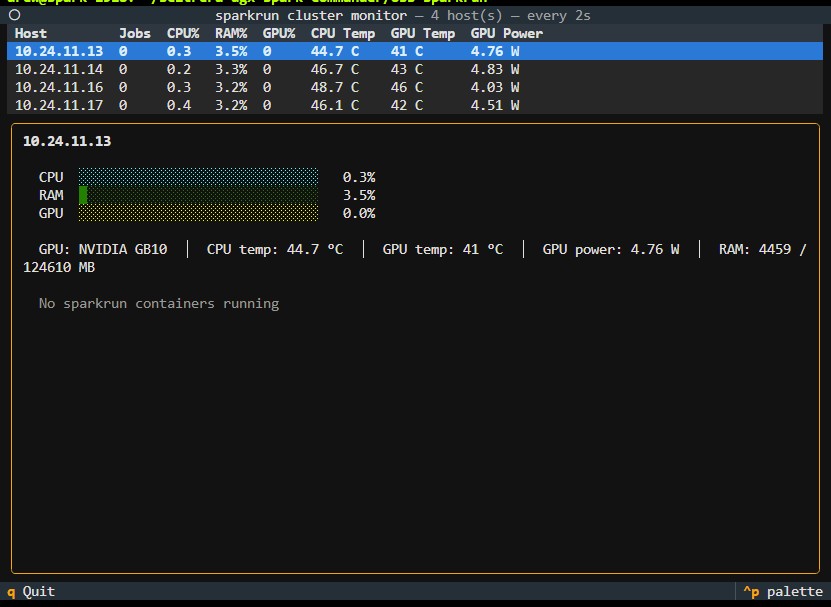
Section titled “Monitor cluster”sparkrun cluster monitor [options]Live-monitor CPU, RAM, and GPU metrics across cluster hosts. By default launches an interactive TUI; pass --simple for plain-text output. Press q (TUI) or Ctrl-C to stop.
| Option | Description |
|---|---|
--hosts / -H | Comma-separated host list |
--hosts-file | File with hosts (one per line) |
--cluster | Use a saved cluster by name |
--interval / -i | Sampling interval in seconds (default: 2) |
--simple | Use plain-text output instead of TUI |
--json | Emit telemetry samples as JSON |
--dry-run / -n | Show what would be done |
sparkrun cluster monitor --cluster mylabsparkrun cluster monitor --cluster mylab --interval 5sparkrun cluster monitor --cluster mylab --simple